In your browser · Computers, tablets and phones

Open a Guitar Pro file in your browser, free.

Stab opens it in its full editor at app.stab.audio: as tab and as a score, played back, ready to loop, change and export. Nothing to install, and no account.

Open a file at app.stab.audioThen drop it on the pageThen choose Import a File
  1. Open app.stab.audio with the button, in this tab.
  2. Drop your file anywhere on the page, or choose Import a File.
  3. It opens to try: edit freely; nothing is kept unless you keep it.
  1. Open app.stab.audio with the button, in this tab.
  2. Choose Import a File and pick your file.
  3. It opens to try: edit freely; nothing is kept unless you keep it.

Works in Chrome, Edge, Firefox and Safari.

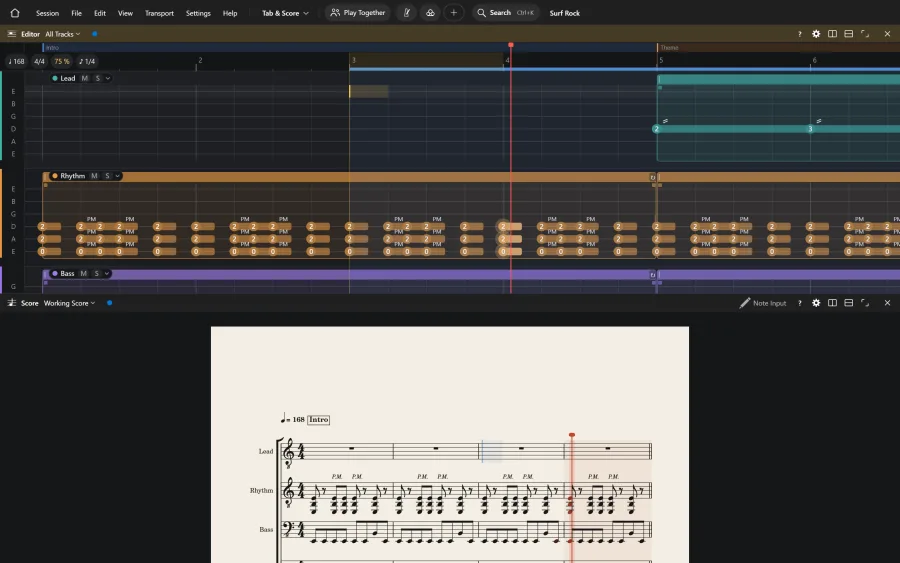
A Guitar Pro file opened in Stab’s web app: its rhythm guitar and bass as tab lanes, the same bars engraved as a score below, a loop playing at 75 % speed

What opens

Guitar Pro 3 to 8, and the files around them.

A Guitar Pro file comes in with every track, its tuning and capo, the techniques, the repeats and the tempo changes. The file itself is never changed.

Bringing music in, in Help →

Open a MIDI file in your browser, as tab →

Open a MusicXML file in your browser →

  • Guitar Pro 3 to 8.gp3 .gp4 .gp5 · .gpx (6) · .gp (7 and 8)
  • MIDI.mid .midi .smf
  • MusicXML.musicxml .mxl .xml
  • Text tab.txt .tab
  • iReal Proa chart saved as a page, .html
  • PDF of printed musicread into notes by Read Music
  • Stab songs.stab

Free, no account

Three things to do with it, free.

Hear it, loop it, slow it down

Press Play and every track sounds through its instrument, a guitar through the amp closest to the one the file calls for. Loop the bars you’re working on and step the speed down until your hands keep up.

Playing and looping in Help →

Read it as tab and score

Each guitar and bass part is a tab lane with its tuning; the Score engraves the same notes, repeats and endings included. Side by side, both follow the playhead.

The Score in Help →

Change it, export it

Fix a fret, add a bar, write a part of your own: every edit is allowed. Then File › Export makes a Guitar Pro 5, MIDI or MusicXML file, or a PDF of the score.

Exporting in Help →

Keep it

Keep the song when you want to.

A file you open is kept in Your Songs, in your browser or a folder on your computer, with your changes saved as you go.

Free

  • As many songs as you like, two tracks each, kept in your browser.
  • Or in a folder on your computer, in Chrome and Edge.

Stab for Mac and Windows

  • One licence for both, bought once: as many songs as you like on your computers, offline.
  • No account needed. Guitar Pro files open with File › Open, or dropped on the window.

Questions

Do I need to install anything?

No. Stab opens in your browser at app.stab.audio, in Chrome, Edge, Firefox or Safari, on a computer, a tablet or a phone. Once it has loaded it keeps itself in the browser, so it opens at once the next time. If you’d rather have it on your computer, Stab for Mac and Windows is a download.

Is it free?

Yes. Opening a file is free, and so are playing it, looping a passage, slowing it down, changing it and exporting it. It's kept in Your Songs, in your browser, with no account. More tracks and whole exports: see Pricing.

Which Guitar Pro versions open?

Files from Guitar Pro 3 to 8: .gp3, .gp4 and .gp5, .gpx (Guitar Pro 6) and .gp (Guitar Pro 7 and 8). We test the import against more than 1,300 real files. PowerTab and TablEdit files don’t open: convert them to Guitar Pro 5 first.

Can I save it?

It's kept in Your Songs as you go, in your browser or a folder on your computer (Chrome and Edge). Or File › Export downloads it as Guitar Pro 5, MIDI, MusicXML or a PDF of the score.

Take a stab.

Open the file, loop the hard bars, and hear them played on the strings.