Score and tab, side by side
Each guitar and bass part comes in as tab, with the frets the score writes or fretted for you; the Score engraves the same notes beside it, a piano on its grand staff. Both follow the playhead.
The Score in Help →In your browser · Computers, tablets and phones
Stab opens it in its full editor at app.stab.audio: the score with its guitar parts as tab beside it, played back and ready to loop, change and export. Nothing to install, and no account.
Works in Chrome, Edge, Firefox and Safari.
Drop it at app.stab.audio: open it with the button, then drop it again.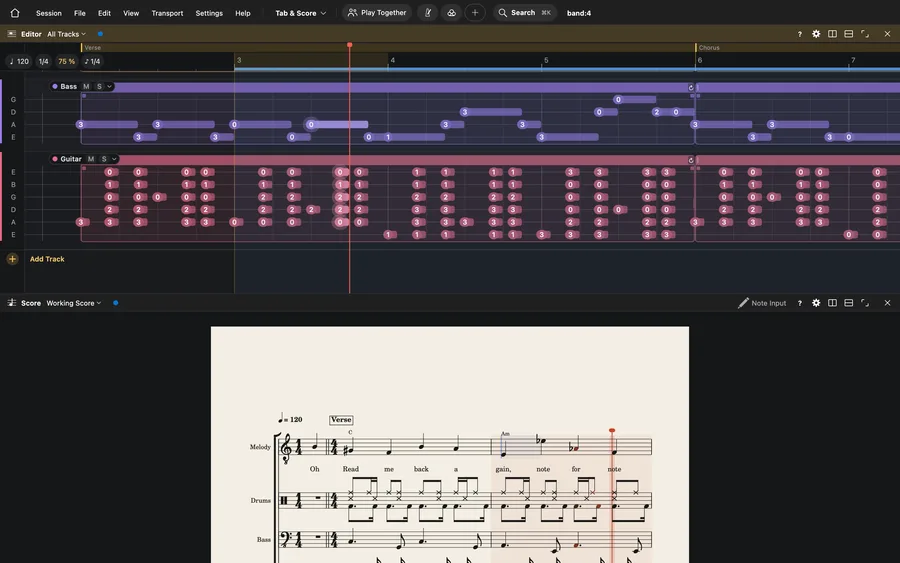
What opens
A MusicXML score comes in part by part: its notes and marks, its title and lyrics, its chord symbols, its repeats and endings, D.S. and coda followed as it plays. The file itself is never changed.
Free, no account
Each guitar and bass part comes in as tab, with the frets the score writes or fretted for you; the Score engraves the same notes beside it, a piano on its grand staff. Both follow the playhead.
The Score in Help →Press Play and every part sounds through its instrument, the repeats and the coda taken as the score says. Loop a passage and step the speed down until your hands keep up.
Playing and looping in Help →Fix a fret, change a note, add a part: every edit is allowed. Then File › Export makes a Guitar Pro file (.gp or .gp5) for a tab app, or MusicXML, MIDI or a PDF of the score.
Exporting Guitar Pro in Help →Keep it
A file you open is kept in Your Songs, in your browser or a folder on your computer, with your changes saved as you go.
No. Stab opens in your browser at app.stab.audio, in Chrome, Edge, Firefox or Safari, on a computer, a tablet or a phone. Once it has loaded it keeps itself in the browser, so it opens at once the next time. If you’d rather have it on your computer, Stab for Mac and Windows is a download.
Yes. Opening a file is free, and so are playing it, looping a passage, slowing it down, changing it and exporting it. It's kept in Your Songs, in your browser, with no account. More tracks and whole exports: see Pricing.
A score exported from a notation app such as MuseScore, Dorico, Sibelius or Finale: .musicxml or .xml, or a compressed .mxl. A timewise score doesn’t open: export it again as an ordinary (partwise) MusicXML file. The score’s page layout isn’t kept: Stab’s Score lays the song out itself.
It's kept in Your Songs as you go, in your browser or a folder on your computer (Chrome and Edge). Or File › Export downloads it as Guitar Pro 5, MIDI, MusicXML or a PDF of the score.
Open the score, read its guitar parts as tab, and hear it played.